
Screen Time Recovery Routine: How to Actually Reset After a Day of Screens
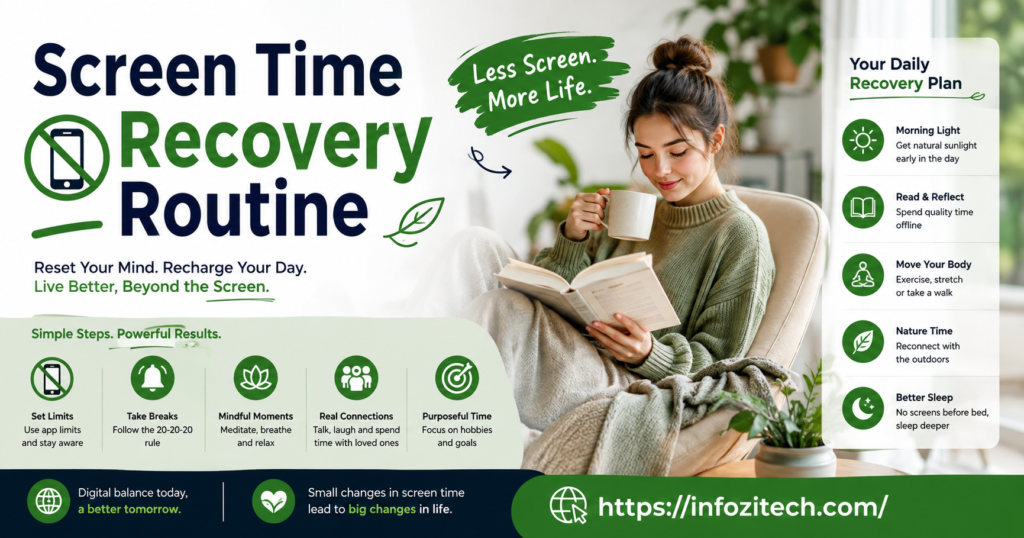
I checked my screen time report last week out of pure boredom, waiting for a kettle to boil, and it said eleven hours. Eleven. I stared at that number for a solid minute like it was going to change if I looked hard enough. It didn’t. And the worst part wasn’t even the number; it was that my eyes had been dry and my head had been buzzing all evening, and I hadn’t once connected the two things until I saw it written down in front of me.
That’s basically why a screen time recovery routine matters, and why most people don’t have one even though they probably need it more than they think. Nobody plans to spend eleven hours staring at glowing rectangles.
What a Screen Time Recovery Routine Actually Is
It’s not a detox. I want to say that up front because people hear “screen time recovery” and picture something extreme, like throwing your phone in a drawer for a weekend. That’s not realistic for most people, and honestly it’s not even necessary. A recovery routine is smaller than that.
Think of it less like quitting and more like stretching after a workout. You’re not avoiding screens forever. You’re just giving your eyes, your brain, and honestly your posture a chance to recover from what you just put them through.
The Three Things Screens Actually Wear Down
Screens hit you in three ways, and most recovery routines address only one, which is why they don’t fully work.
There’s the physical strain — dry eyes, tension headaches, that tight feeling in your neck from looking down at a phone for hours. Then there’s the mental fog, which is different; it’s that scattered, can’t-focus feeling that comes from constant notifications and tab-switching all day. And then there’s the sleep disruption piece, which is its own animal entirely, tied to blue light and just the mental stimulation of scrolling right before bed.
A routine that only handles one of these — say, blue light glasses for the eyes — leaves the other two completely untouched. That’s usually why people try one fix, it doesn’t fully work, and they give up on the whole idea.
Why Timing Matters More Than People Realize
Doing a recovery routine at the wrong time barely helps. Stretching your neck at 3 p.m. when you’ve got six more hours of screen time ahead of you is fine, but it’s not recovery; it’s just a pause. Real recovery routines cluster around two windows — right after a heavy screen block, like after work, and in the hour before bed, when the stakes are highest because bad screen habits there wreck your sleep, which then wrecks the next day too.
Building the Physical Reset
This is the part most people skip, mostly because it feels less urgent than the mental stuff, but honestly it’s often the fastest win.
Eye Relief That Actually Does Something
The 20-20-20 rule gets mentioned constantly and for good reason — every 20 minutes, look at something 20 feet away for 20 seconds. It sounds too simple to matter, but it genuinely reduces the strain that builds up from staring at one fixed distance all day. Pair that with just blinking more deliberately, since screens cut your blink rate almost in half without you noticing, and your eyes dry out from that alone.
A warm compress at the end of the day helps too. Not glamorous, just a warm washcloth over closed eyes for a few minutes, but it loosens up the muscles around your eyes in a way that a five-minute break in front of a different screen never will.
Fixing What Screens Do to Your Body
Neck and shoulder tension from “tech neck” — that forward head position from looking down at phones — doesn’t go away on its own. A few minutes of neck rolls, shoulder shrugs, and just physically looking up and around the room resets a posture your body’s been locked into for hours. It feels almost too basic to write down, but most people genuinely don’t do it until their neck actually hurts.
The Walk That Isn’t About Exercise
A short walk, even five minutes, even just to the end of the street and back, does something a stretch alone can’t — it gets you looking at variable distances again, moving your whole body instead of just your fingers and eyes, and honestly it just gets you out of the chair you’ve been fused to for hours.
Resetting Your Brain, Not Just Your Eyes
The mental fog piece is trickier because it’s not physical; it’s more about how scattered your attention gets from constant switching between apps, tabs, notifications, all day long.
Give Your Brain Something Boring to Do
This sounds backwards, but it works — after a heavy screen day, doing something deliberately boring, like folding laundry or washing dishes, actually helps your brain settle. There’s research on this, something about how boring tasks let your mind wander in a restorative way instead of the fragmented way scrolling does. Basically, your brain needs a task with zero notifications and zero decisions, and most of daily life doesn’t offer that anymore except chores.
Write Down the Tabs in Your Head
Mental fog after heavy screen time often comes from having a dozen open loops — half-finished emails, things you meant to look up, a conversation you left on read. Just writing these down, even in a messy list, closes some of those loops mentally even before you act on any of them. It’s a small thing, but it genuinely reduces that buzzing, unfinished feeling.
Quiet Time With No Backup Screen
This one’s harder than it sounds. Sitting somewhere with no screen and not immediately reaching for another one — no podcast, no music even, just quiet — for ten minutes recalibrates something that constant stimulation wears down. Most people can’t do this without fidgeting for the first few days. That’s kind of the point, actually; it shows how used to constant input you’ve become.
Protecting Your Sleep From the Day’s Screen Time
This is the part where a recovery routine really earns its keep, because bad screen habits before bed don’t just cost you that hour; they cost you the whole next day too.
The Cutoff That Actually Matters
A hard cutoff, somewhere between 30 and 60 minutes before bed, where you’re just done with screens, makes a bigger difference than any blue light filter or night mode setting. It’s not really about the light itself, though that’s part of it — it’s about your brain not being mid-scroll, mid-video, mid-anything when you’re trying to wind down.
Replace, Don’t Just Remove
Just telling yourself to stop using your phone before bed rarely works on its own; there’s a vacuum where the phone used to be and your hand just drifts back to it. Replacing it with something specific — reading an actual physical book, stretching, even just lying there in the dark for a few minutes — gives your hands and your brain somewhere else to go instead of defaulting back to the glowing rectangle.
Dim Everything, Not Just the Screen
People fixate on screen brightness and dark mode but forget the room around them is still lit up like an operating room. Dimming the actual lights in your space in the hour before bed does more for winding your brain down than any phone setting, because it’s a signal your whole environment is sending, not just one device.
Putting a Routine Together That You’ll Actually Do
The mistake most people make here is building a recovery routine that’s too long, too perfect, too much like a checklist from a wellness blog that nobody actually follows past day two.
Start With One Piece, Not All of Them
Pick one thing — the eye rule, the walk, the sleep cutoff, whatever feels most doable — and just do that consistently for a week before adding anything else. Trying to overhaul your entire relationship with screens overnight is exactly how these routines die within three days.
Attach It to Something You Already Do
A recovery routine sticks better when it’s tied to an existing moment in your day rather than floating on its own. Right after you close your laptop for work. Right when you plug your phone in to charge for the night. These little anchor points make the routine feel automatic instead of like one more thing competing for your willpower.
Expect It to Feel Unnecessary at First
For the first several days, a recovery routine feels like overkill, like you’re doing stretches for a problem you’re not even sure you have. That feeling usually fades once you notice the difference on days you skip it — the headache that shows up, the wired-but-tired feeling at night, the eyes that feel like sandpaper by 9 p.m.
Final Thoughts
A screen time recovery routine isn’t about guilt or hitting some perfect number on a screen time report. It’s about noticing that hours of staring at glowing rectangles actually cost you something — your eyes, your focus, your sleep — and doing a handful of small, boring things to undo some of that cost before it piles up. Start with one piece. Attach it to something you already do. Give it more than three days before deciding it’s not working. Eventually the routine stops feeling like a task and starts feeling like the thing that quietly keeps you from ending every day feeling fried.









2 thoughts on “Screen Time Recovery Routine: How to Actually Reset After a Day of Screens”