
Cloud Storage vs Local Storage: What’s the Real Difference?
I lost a semester’s worth of design files once. Not backed up anywhere, just sitting on a laptop that decided to die on a Tuesday morning, no warning, no clicking noises beforehand, nothing. One minute it’s fine. The next it’s a black screen and a very expensive paperweight. That’s the moment I actually started caring about where my files live, because before that I genuinely never thought about it. Why would you? It’s just storage. Until it isn’t there anymore.
So let’s talk about the two main options people argue about, cloud storage and local storage, and why the difference matters way more than most people assume until something breaks.
What Is Local Storage?
Local storage is the stuff you can physically touch. Hard drives, SSDs, flash drives, memory cards. The thing sitting in your laptop right now, or that external drive you keep meaning to back up but haven’t touched since March.
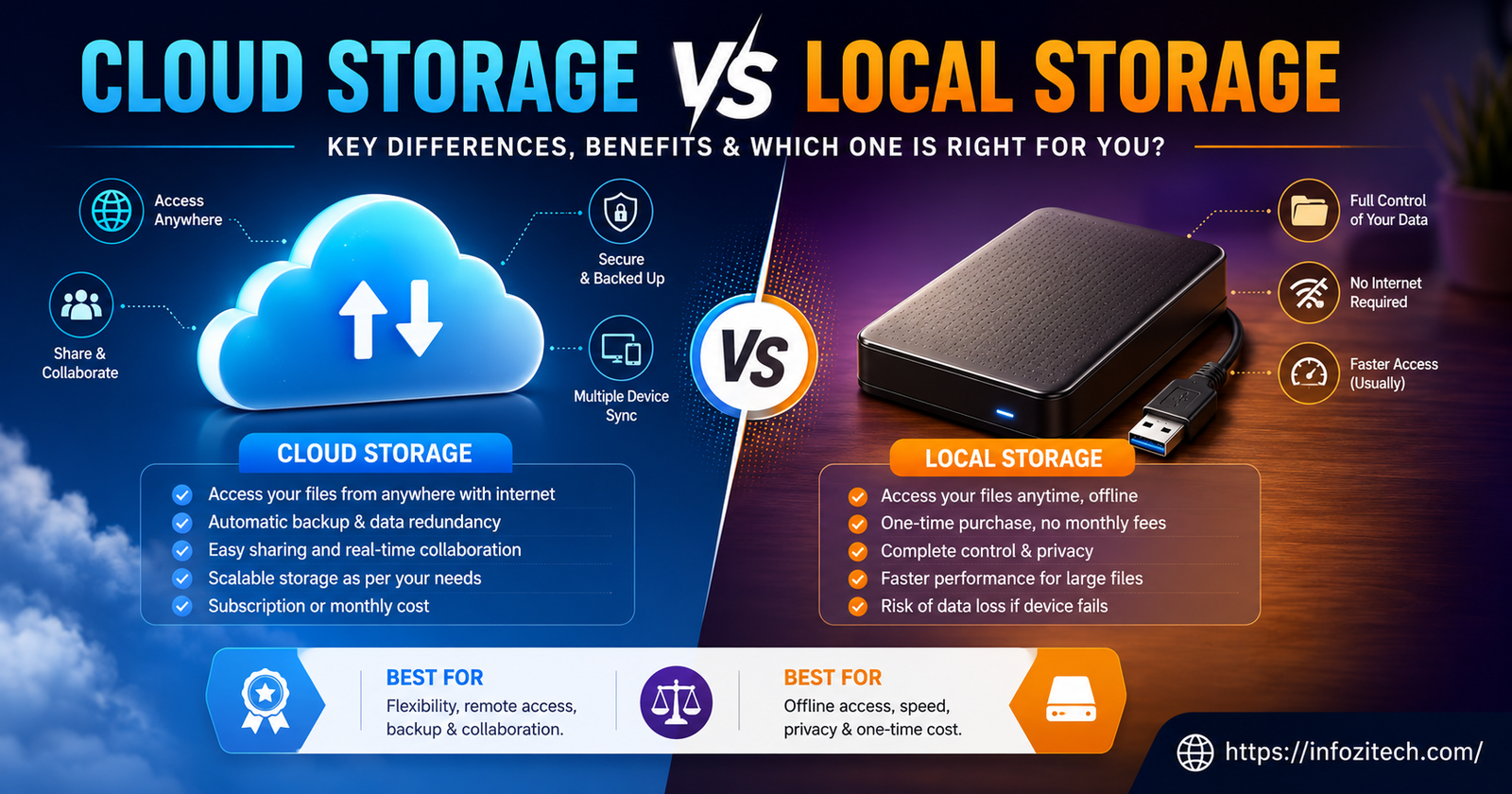
Here’s the thing about local storage though: it doesn’t need the internet. At all. You could be on a plane with no wifi, no signal, nothing, and still open every file on that drive. That’s honestly its biggest selling point, and people forget it because we’re so used to everything requiring a connection these days.
My uncle still keeps everything on external hard drives. Labels them by hand. Three copies of his tax documents going back a decade. It looks excessive until you remember that man has never lost a file in his life, and I have lost several.
How Local Storage Actually Works
Without getting too technical because honestly I’ll lose the thread if I try, your device has a controller and a file system, and that system organizes your data into blocks on the physical drive. When you open a file, your computer talks directly to that hardware. No middleman. No server somewhere in another country. Just you and the drive, having a conversation nobody else is part of.
Common Types You’ve Probably Used
Internal hard drives, the ones built into your laptop or desktop. SSDs, which are faster and increasingly standard now. USB flash drives, the kind that end up in junk drawers by the dozen. External hard drives. SD cards for cameras. And NAS devices, which are basically mini servers people keep at home, though most regular users never touch those.
What Is Cloud Storage?
Okay, so cloud storage is basically the opposite idea. Instead of a drive sitting on your desk, your files live on servers owned by someone else, somewhere else, and you reach them through the internet. Google Drive. Dropbox. iCloud. OneDrive. You’ve used at least one of these, probably without thinking of it as “cloud storage“; it’s just where your photos automatically end up now.
When you upload something, it doesn’t just sit on one machine. It gets copied across multiple servers, sometimes in different physical locations entirely, so if one server has a bad day, your file isn’t gone. You just see a folder icon that looks familiar. Behind it, a whole building full of humming machines is doing the actual work, and you never think about it, which is kind of the point.
How It Works, Roughly
You upload a file, it travels over the internet to a data center and gets stored redundantly across servers. Later you request it; your device pings the server, the server sends it back. It feels instant most of the time. It is not actually instant; there’s a whole network dance happening, you just don’t see it.
Providers People Actually Use
Google Drive, Dropbox, OneDrive, iCloud for anyone deep in the Apple ecosystem. Amazon S3 shows up more on the business side of things, developers and companies rather than regular folks. Backblaze too, less known but solid for backups specifically.
Okay, So What’s Actually Different Here
This is the part people actually care about. Not the definitions. The real, does-this-affect-my-life stuff.
Getting to Your Files
Local storage only works where the device physically is. Left your external drive at home? Too bad, it’s not coming to you. Cloud storage doesn’t care where you are- phone, tablet, some random computer at a library- doesn’t matter, as long as there’s internet you’re in.
This alone is why so many people switched to cloud stuff without even really deciding to. It just happened gradually, one convenient sync at a time.
Money
Buy a hard drive, pay once, done, aside from eventually needing a new one when it dies or fills up. Cloud storage is subscriptions. Monthly or yearly, and it adds up. Sometimes it adds up to more than buying a physical drive would’ve cost, over a few years anyway. But you’re not just paying for space; you’re paying for the redundancy and the access from anywhere, which is worth something even if it’s hard to put a number on.
Security, Which Honestly Nobody Fully Agrees On
Local storage means total control. Nobody touches your files unless they physically get your device. Which sounds great until you realize you’re now the entire security team. Encryption, physical safety, all of it, on you.
Cloud providers throw serious resources at security: dedicated teams, encryption at scale, stuff an average person could never replicate at home. But you’re trusting a company with your data now, subject to whatever their policies are, and breaches do happen occasionally, even at big providers.
Neither Side Wins This One Cleanly
A cloud company with a real security team might actually protect your stuff better than a flash drive tossed in a backpack. But a local drive that’s never connected to the internet literally cannot be hacked remotely; there’s no path in. It depends what you’re actually worried about, honestly, and most people never think that far.
Speed
Local wins here, no contest, if you’re moving big files. Video editors know this. Pulling a huge project file off a local SSD versus waiting on an upload or download over the internet, it’s not close.
Cloud speed lives and dies by your connection. Good wifi, barely notice it. Bad wifi, a two-minute transfer turns into twenty minutes of staring at a progress bar wondering if it froze.
What Happens When Things Break
This is where local storage really shows its weak spot. Drives fail. Flash drives vanish into couch cushions or get left in hotel rooms. Laptops get stolen. No backup means one bad day wipes out everything, permanently, no do-overs.
Cloud storage spreads your data across multiple servers so one failure usually doesn’t mean total loss. Still not bulletproof though, accounts get hijacked, deletions sync across every device before you notice, companies occasionally shut down. Nothing’s actually invincible here.
Growing Your Storage
Need more local space, buy another drive. Fine occasionally, annoying if your needs keep shifting. Cloud storage scales in about thirty seconds, click upgrade plan, done. Businesses especially like this because storage needs rarely stay flat.
Sharing Stuff With Other People
Sharing from local storage means physically handing over a drive or emailing files one at a time, manually, which gets old fast with a team. Cloud storage was basically built for this exact problem, multiple people editing the same doc at once, changes syncing automatically. Half the reason workplaces run on cloud tools now.
So Which One Do You Actually Need
Honestly? Probably both, in some combination, depending on what you’re doing.
Local storage makes sense if you’re working with massive files regularly, video, huge design projects, that sort of thing. Or if you just don’t want a third party anywhere near your data. Or you’re tired of subscription fees stacking up.
Cloud storage makes more sense if you bounce between devices constantly, or collaborate with people regularly, or just want backups happening automatically without babysitting them yourself.
My uncle with his labeled hard drives? That works for him. I use a mix now, cloud for anything I’m sharing or working on across devices, a local backup drive for the heavy stuff I don’t want to re-upload every time. Neither approach is objectively correct, it depends entirely on what you’re actually doing with the files and how paranoid you are, reasonably or not, about losing them.
Final Thoughts
There’s no clean winner between cloud and local storage because they’re solving different problems entirely. Local gives you speed and total control and a cost that stops after you buy the thing. Cloud gives you access from anywhere and easier collaboration and backups that happen whether you remember to do them or not, but it costs you monthly and depends on your internet actually working.
Figure out what actually matters to you, cost, speed, control, convenience, whatever it is, and build around that. Most people end up using a mix eventually anyway, usually after losing something important the hard way, like I did with that laptop. Learn from my dead hard drive instead of your own, if you can.







3 thoughts on “Cloud Storage vs Local Storage: What’s the Real Difference?”