
Passwordless Login Business Guide: Why Companies Are Ditching Passwords in 2026
A friend runs IT for a mid-size healthcare company. Told me something a while back I still think about. “We spend more on password resets than we do on actual security tools.” I laughed, figured he was exaggerating. He wasn’t. Help desk tickets for forgotten passwords, locked accounts, the 11 pm “I think someone got into my email” panic messages — it adds up fast, and it’s not just annoying. It’s expensive. And it’s a security hole wearing a convenience costume.
That’s basically the whole story of why passwordless login stopped being a Silicon Valley talking point and turned into something finance teams actually budget for now. Passwords were never that secure to begin with, not really. People reuse them. Write them on sticky notes and stick them to a monitor where anyone walking by can read them. Pick “Summer2024!” and call it a day, add an exclamation point, and feel very secure about it. Passwordless isn’t some futuristic gimmick. It’s a fix for a problem companies have quietly bled money over for two decades running.
This guide walks through what passwordless login means for a real business — not the marketing version — how it works under the hood, what a rollout entails, and where companies tend to trip over their own feet trying to get there.
What Passwordless Login Actually Means
Worth clearing up first, because the term gets thrown around loosely and a lot of companies think they’re “passwordless” when really they’ve just hidden a password behind something else.
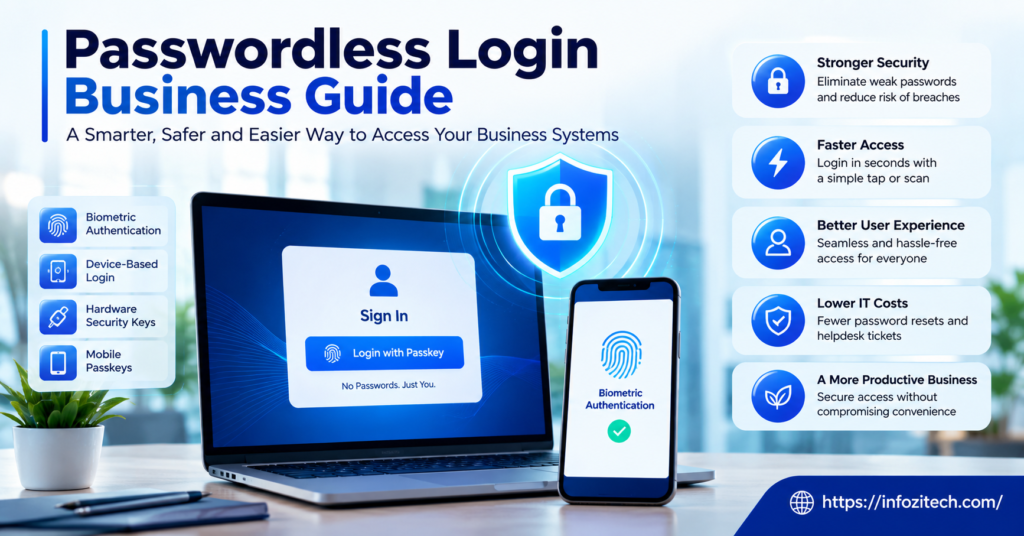
True passwordless authentication means there’s no password stored anywhere for anyone to type, forget, reuse, or have stolen. Verification happens instead through something a person has — a device, a security key — or something they are, a fingerprint, a face scan. Sometimes it’s a magic link to an already-verified email. Sometimes a one-time code, though those get lumped into “passwordless” a little generously since you’re still typing something in, just not a password you chose yourself.
The real shift isn’t removing a text field from a login page. It’s removing the single biggest point of failure enterprise security has had for as long as anyone can remember. Somewhere around ninety percent of breaches — the number moves depending on which report you’re reading — trace back to stolen or weak credentials somewhere along the chain. Take the password out and a huge chunk of that attack surface just isn’t there to attack anymore.
Why Businesses Are Making the Shift
The Security Argument
Phishing works because it tricks someone into typing a password where it shouldn’t go. No password, no target, not in the traditional sense anyway. Credential stuffing — attackers throwing leaked password lists at a login page hoping something sticks — stops working entirely when there’s nothing to stuff. That alone wipes out a big share of what IT teams deal with week to week.
Biometrics and device-based auth also solve the reuse problem, which might honestly be the bigger issue of the two. People reuse passwords across a dozen accounts because remembering thirty unique ones is unreasonable, and nobody actually does it, no matter how many times security training says to. Passwordless removes the temptation because there’s nothing left to remember in the first place.
The Cost Argument
This is the part that gets budget approved, if we’re being honest about it. Password reset tickets are one of the most common categories of help desk work, and one of the most expensive. Multiply an average reset cost by however many resets a mid-size company processes a year, and it’s not a small number — some companies find it eats a meaningful slice of the entire IT support budget, just from people forgetting passwords.
There’s a quieter cost too, harder to put a figure on. Lost productivity. Someone locked out for twenty minutes waiting on a reset isn’t working. Do that across a few hundred employees a few times a year, it adds up to real hours nobody’s tracking on any spreadsheet.
The Experience Argument
Employees hate passwords. Not a controversial statement; everyone already knows this. Complex requirements, forced rotations every ninety days, the special-character-number-capital-letter gymnastics that modern cracking tools chew through in seconds anyway — none of it actually makes anyone safer. It just makes people frustrated, and more likely to write the thing down somewhere it shouldn’t be written.
A fingerprint scan or a tap on a security key takes less time and less mental effort than typing a password most people barely remember to begin with. Login gets faster, less annoying, and adoption of other security measures tends to improve too — people aren’t already worn out from fighting the login screen before they even get to the actual work.
How Passwordless Authentication Works
Biometric Authentication
Fingerprints, facial recognition, occasionally voice. Key detail people miss — the biometric data usually never leaves the device. Your phone or laptop verifies the fingerprint locally, sends a cryptographic confirmation, not the fingerprint itself, to whatever system is checking. Matters a lot in privacy conversations with employees who get understandably uneasy about “the company has my fingerprint now” without knowing that detail.
Security Keys and FIDO2
Physical keys, YubiKeys being the name most people recognize, plug into USB or tap via NFC. These run on a standard called FIDO2, genuinely phishing-resistant because authentication ties to the specific site or app it was set up for. Even a near-perfect phishing clone of a login page can’t trick a security key into authenticating — the key checks the actual domain underneath, not what’s rendered on screen.
Magic Links and One-Time Codes
Simpler. Lower barrier. Also the weakest link in the passwordless family, if we’re being honest about it. A magic link sent to email is only as secure as the email account itself — which, circular problem here, usually still depends on a password somewhere upstream. Fine for lower-risk stuff. Less fine for anything touching sensitive data.
Push Notification Authentication
The “approve this login?” notification a lot of people already know from Duo or Okta. Login attempt fires a push to a registered device; the user taps approve or deny. Simple, familiar. Though it opens the door to something called MFA fatigue attacks — someone gets bombarded with approval requests until they tap yes just to make the notifications stop. Worth knowing before rolling this out at scale, not after.
Planning a Passwordless Rollout
Start With a Risk Assessment
Not every system needs the same level of protection. Whatever’s holding customer payment data deserves stronger authentication than the internal tool for booking conference rooms — obvious when you say it out loud, less obvious when a company’s rushing to roll something out everywhere at once. Map what’s actually sensitive first. Then decide which method goes where, instead of picking one solution and either overspending or underprotecting depending on the system.
Choose the Right Method for the Right Use Case
Security keys for admins and anyone touching critical systems. Biometrics for general employee logins on company devices. Push notifications where speed and familiarity matter more than maximum security. Mixing methods based on actual risk tends to work out better than picking one thing and forcing it on everyone regardless of what they actually need.
Pilot Before Full Rollout
Rolling this out company-wide on day one is asking for trouble, plain and simple. Start with one department — ideally a tech-comfortable one that won’t panic the first time something doesn’t work right. Collect feedback. Fix what breaks. Then expand. Sounds obvious written down like this, and yet a surprising number of companies skip straight to company-wide rollout and end up fielding a wave of confused tickets they could’ve avoided with a two-week pilot.
Keep a Fallback Option
Devices get lost. Phones die at the worst moment. A fingerprint doesn’t scan right after a minor cut or a burn — happens more than people expect. Passwordless systems still need a backup path for these situations, and ideally that backup doesn’t quietly reintroduce a password through the back door, which would sort of defeat the entire point of doing any of this.
Common Roadblocks
Legacy Systems
Older software wasn’t built with modern authentication standards in mind, and some of it just can’t support passwordless methods without serious rework or a full replacement. Usually the biggest technical blocker, and usually underestimated at the planning stage — not because anyone’s careless, but because legacy systems have a talent for hiding complexity until someone actually starts digging into them.
Employee Resistance
Change is uncomfortable even when it’s a clear improvement. Some employees will be suspicious of biometric data collection. Others just don’t want to learn a new process, however small it actually is. Clear communication about what’s being collected — and just as important, what isn’t — goes a long way toward heading this off before it turns into pushback bigger than it needs to be.
Cost of Hardware
Security keys aren’t expensive one at a time, but multiply that by a few thousand employees and it’s a real number finance is going to ask about. Biometric auth riding on devices employees already have sidesteps this cost entirely, part of why it’s often the more practical starting point for bigger organizations trying to keep that budget conversation short and painless.
Conclusion
Passwordless login isn’t a trend businesses can afford to sit out and wait on. Passwords have been a weak point for decades now, and the tools to replace them are mature enough that the excuses for not switching are running thin. The businesses handling this well aren’t necessarily the ones with the fanciest security keys — they’re the ones that took time to assess actual risk, picked methods that fit different parts of the org, and rolled it out in stages instead of flipping one switch and hoping.
Not a project that wraps in a quarter. Not free either. But weighed against what companies already lose to password resets, phishing, credential theft, passwordless tends to pay for itself faster than most security spending does — and it makes logging in less of a daily headache for everyone stuck doing it, which is worth something on its own.







2 thoughts on “Passwordless Login Business Guide: Why Companies Are Ditching Passwords in 2026”