
Healthy Desk Setup to Reduce Daily Fatigue
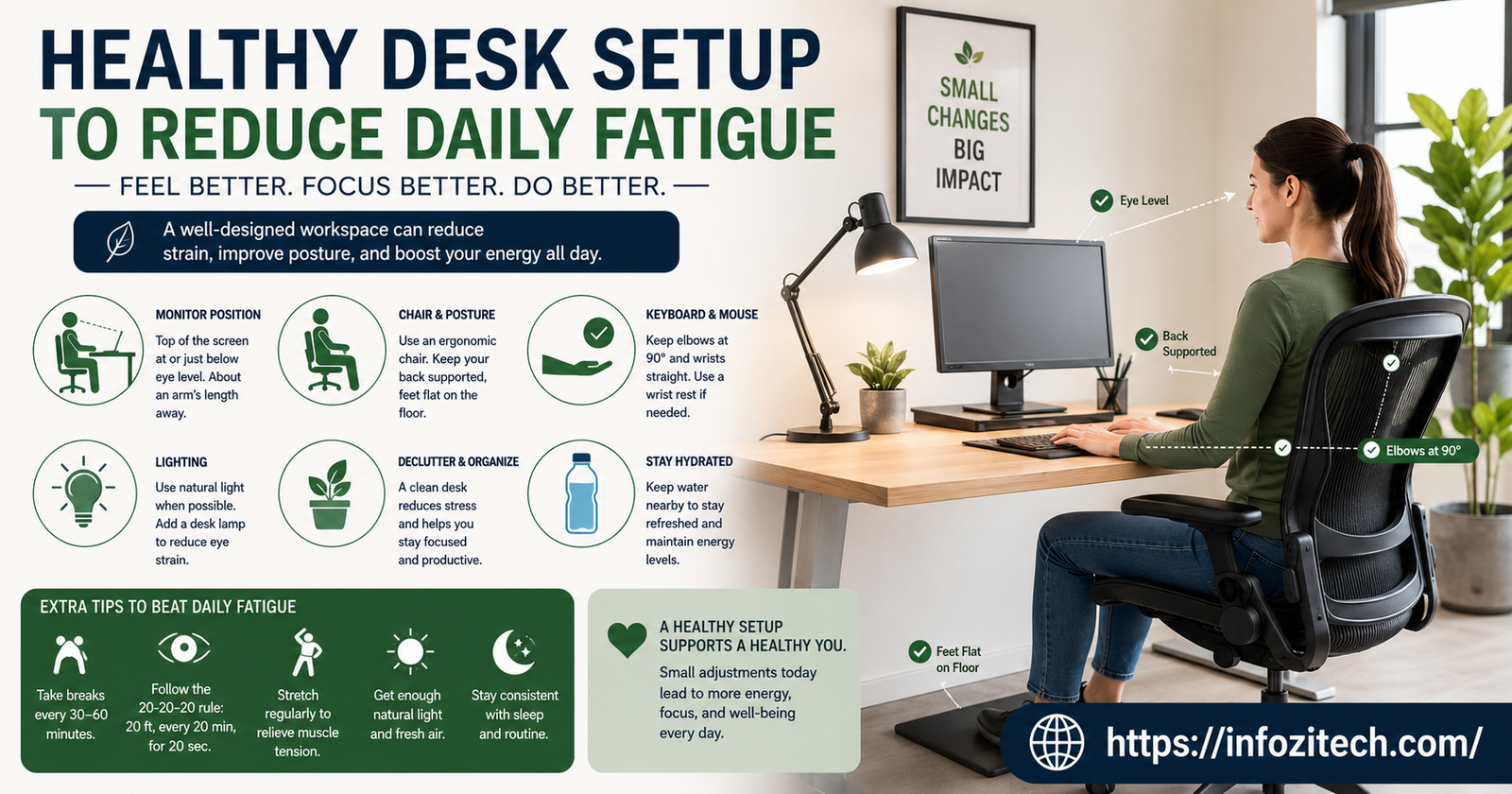
Used to blame my afternoon crash entirely on sleep, or coffee timing, or just being “not a morning person,” whatever that even means. Took me embarrassingly long to notice the crash always hit around the same time regardless of how well I’d slept the night before, and it eventually clicked that maybe it wasn’t sleep at all — maybe it was the fact I’d been sitting hunched forward, squinting slightly at a monitor that was too low, for five straight hours by that point. Fixed the desk setup, mostly out of desperation honestly, and the 3 pm wall just… mostly stopped happening. Not entirely. But a lot.
This isn’t about buying a fancy standing desk or dropping a few hundred dollars on an ergonomic chair, though those help if you’ve got the budget. It’s about the actual mechanics of how your desk is set up right now, today, and the handful of adjustments that make the biggest difference for the least effort.
Why Your Desk Setup Might Be Draining You More Than Your Sleep Is
Fatigue gets blamed on sleep, diet, stress, all the usual suspects, and sure, those matter. But a desk setup that’s fighting your body for eight hours a day adds up to a specific, physical kind of tired that no amount of extra sleep really fixes.
Bad Posture Is Expensive, Energy-Wise
Holding your body in a slightly wrong position, even a small one, forces muscles to work constantly just to keep you upright and stable. Multiply that low-grade effort across eight hours, and it’s genuinely exhausting, in a way that’s separate from mental fatigue entirely. Your body’s just spending energy it doesn’t need to spend, all day, on stabilizing a position it wasn’t built to hold.
Poor Setup Restricts Blood Flow and Breathing
A chair that’s too low, a desk that forces your shoulders up, a monitor that has you craning your neck forward — all of it can subtly restrict circulation and even shallow out your breathing without you noticing. Less oxygen moving through your system, more fatigue. Simple as that, though it took me a while to actually connect those dots.
Eye Strain From Screen Position Compounds Everything Else
A monitor at the wrong height or distance forces your eyes to work harder too, which ties back into that gritty, burnt-out feeling covered in a lot of eye strain advice out there. Combine tired eyes with a body that’s fighting bad posture all day, and it’s really no mystery why 3 pm feels like hitting a wall.
Getting Your Chair Right First
The chair’s the foundation of everything else here, so it makes sense to start there before touching anything else on the desk.
Feet Flat, Knees at Roughly 90 Degrees
Your feet should rest flat on the floor, or on a footrest if your chair’s too tall for your legs, with your knees bent around ninety degrees. Feet dangling or knees jammed up too high both create pressure points that your body compensates for constantly, which burns energy you don’t have to spare.
Lower Back Support Isn’t Optional
A chair without real lumbar support forces your lower back to round forward over time, which cascades into your whole upper body slumping to compensate. A cushion or a rolled towel behind your lower back works fine if your chair doesn’t have built-in support, doesn’t need to be expensive.
Armrests at the Right Height, or Skip Them Entirely
Armrests should let your shoulders sit relaxed, not hiked up toward your ears. If they’re the wrong height and can’t be adjusted, it’s often better to remove them entirely than let them force your shoulders into a raised, tense position for hours at a stretch.
Monitor Height and Distance: The Fix Most People Skip
This is the adjustment that made the biggest difference for me personally, and it’s also the one most people never bother making because it feels fussy.
Top of the Screen at Eye Level, or Just Below
Your monitor’s top edge should sit roughly at eye level, maybe a touch below, so your gaze falls slightly downward at the middle of the screen. Too low and you’re hunching forward to compensate; too high and your neck’s tilted back for hours; neither one’s sustainable.
Arm’s Length Away, Not Closer
Screen distance should be roughly arm’s length, maybe a bit more for larger monitors. Too close forces your eyes to work harder focusing; too far and you end up leaning forward to read text, which drags your whole posture out of alignment along with it.
Laptops Need Help Here, Almost Always
A laptop screen sitting flat on a desk is basically guaranteed to be too low, forcing your neck down and forward for hours. A laptop stand, or honestly a stack of books, raised to the right height, paired with an external keyboard and mouse, fixes this for basically no money at all.
Keyboard and Mouse Position
Small adjustments here, but they add up over the course of a full workday more than people expect.
Elbows Close to Your Body, Roughly 90 Degrees
Your keyboard should sit at a height where your elbows stay close to your sides, bent around ninety degrees, not reaching forward or up. Reaching forward constantly, even slightly, tires out your shoulders and upper back over a full day without you really clocking why.
Wrists Neutral, Not Bent Up or Down
Wrists should stay roughly flat, neither cocked upward nor drooping down while typing. A wrist rest helps here if your desk height forces an awkward angle, though the better fix is usually adjusting desk or chair height first.
Mouse Close to the Keyboard, Not Off to the Side
A mouse positioned too far to the side forces repeated reaching that adds up across hundreds of clicks a day. Keep it right next to your keyboard so your arm stays in a natural, relaxed position.
Lighting and Environment Around the Desk
Posture and screen position get most of the attention, but the environment around your desk plays a real role in daily fatigue too.
Avoid Screen Glare From Windows or Overhead Lights
Glare forces subtle squinting that adds up to real eye strain by the end of the day, even if you don’t consciously notice it happening in the moment. Position your monitor perpendicular to windows rather than facing them directly, and adjust overhead lighting if it’s reflecting off your screen.
Get Some Natural Light If You Can
A desk near a window, even if you’re not staring directly at it, helps regulate your energy through the day better than a dim, artificially lit room does. If natural light’s not available, a decent desk lamp that’s not harsh or flickery makes a difference too.
Keep the Space Around Your Desk Reasonably Clear
Clutter’s not just a mental distraction, a cramped desk often forces awkward postures too, reaching around stacks of stuff or twisting to avoid a pile of papers. A bit of clear space around your actual work area removes a source of physical strain you might not have connected to fatigue at all.
Building Movement Into the Setup Itself
Even a perfect setup can’t fully offset hours of stillness, so the setup should make movement easier, not just posture better.
A Setup That Makes Standing Up Easy
If you’ve got a sit-stand desk, use it, even just for short stretches through the day. If you don’t, make sure nothing about your setup, cords, chair position, whatever, makes it a hassle to just get up for a minute here and there.
Keep Water Within Reach, But Not Too Within Reach
A water bottle right at your desk helps you stay hydrated, which genuinely affects energy levels, but placing it just far enough that reaching for it means standing up adds in a tiny bit of forced movement too, which is a small trick but it works.
Final Thoughts
A healthy desk setup to reduce daily fatigue isn’t about an expensive chair or a fancy standing desk, though those help if it’s in the budget. It’s mostly free adjustments — chair height, monitor position, keyboard placement, a bit of lighting awareness — that stop your body from quietly fighting itself for eight hours straight. Fix the setup and a surprising amount of that mid-afternoon crash people just assume is normal starts fading on its own, no extra sleep required.









2 thoughts on “Healthy Desk Setup to Reduce Daily Fatigue”