
Free Help Desk Software Comparison: Which Tool Actually Deserves Your Time in 2026
There’s a specific moment every small team hits. Support emails start stacking up in some shared inbox nobody quite owns. A ticket sits untouched for three days. Then a customer vents about it on social media, and suddenly everyone’s scrambling. Somebody says the words “we need real help desk software” out loud, and right behind that comes the next question: do we actually have to pay for this thing?
Mostly, no. Not at first anyway. There’s a real handful of free help desk tools worth looking at, and a few of them aren’t just watered-down trial bait designed to nag you into upgrading within a week. This is a rundown of the ones that hold up, what each one skimps on, and roughly who they’re built for.
Why “Free” Is Worth Taking Seriously Here
People assume free means gutted. Sometimes, sure, that’s fair. But quite a few vendors in this space treat their free tier as a genuine onboarding funnel rather than a locked demo. They want you comfortable inside their ticketing system so that when you outgrow it, you upgrade instead of going shopping elsewhere. Makes sense from their side.
Still — and this part matters — free seldom means unlimited. There’s a cap somewhere. Agent seats, tickets per month, automation you’ll want the second your volume grows past a trickle. Figure out where that ceiling sits before you build three months of workflow around a tool, because migrating tickets later is nobody’s idea of a good afternoon.
What Actually Matters Before You Pick One
Number of Agents Included
This is the wall almost everyone hits first. A one- or two-agent cap works fine if you’re a solo founder answering your own emails. It’s useless the moment you’ve got five people fielding tickets. Check this number before you check anything else, honestly.
Ticket Volume and Storage Limits
Some free plans throttle how many tickets you can push through per month, or quietly cap how long history sticks around before it disappears. If you run an online store and your ticket volume spikes every November, this is exactly the kind of limit that bites at the worst possible time — right when you can least afford it.
Channels Supported
Email-only support was fine, I don’t know, a decade ago? Now people expect chat. Increasingly, they expect WhatsApp or some social channel too. A lot of free tiers restrict you to email plus maybe one basic chat widget, so figure out what channels your actual customers use before assuming the free plan covers it.
Automation and Reporting
This is usually the first thing stripped out. Vendors know automation is what pushes people toward paid plans, so free tiers get the bare minimum — simple rules, no branching logic. If your team leans hard on auto-assignment or SLA tracking, the free tier will start to feel cramped fast, probably within a month or two.
Self-Hosted vs Cloud-Hosted
A couple of tools here, osTicket and Zammad specifically, can be self-hosted. No monthly bill, ever. But somebody on your team now owns the server, the updates, the security patches. That’s a real cost even if no invoice shows up for it.
The Comparison: 7 Free Tools Worth Actually Considering
1. Freshdesk (Sprout Plan)
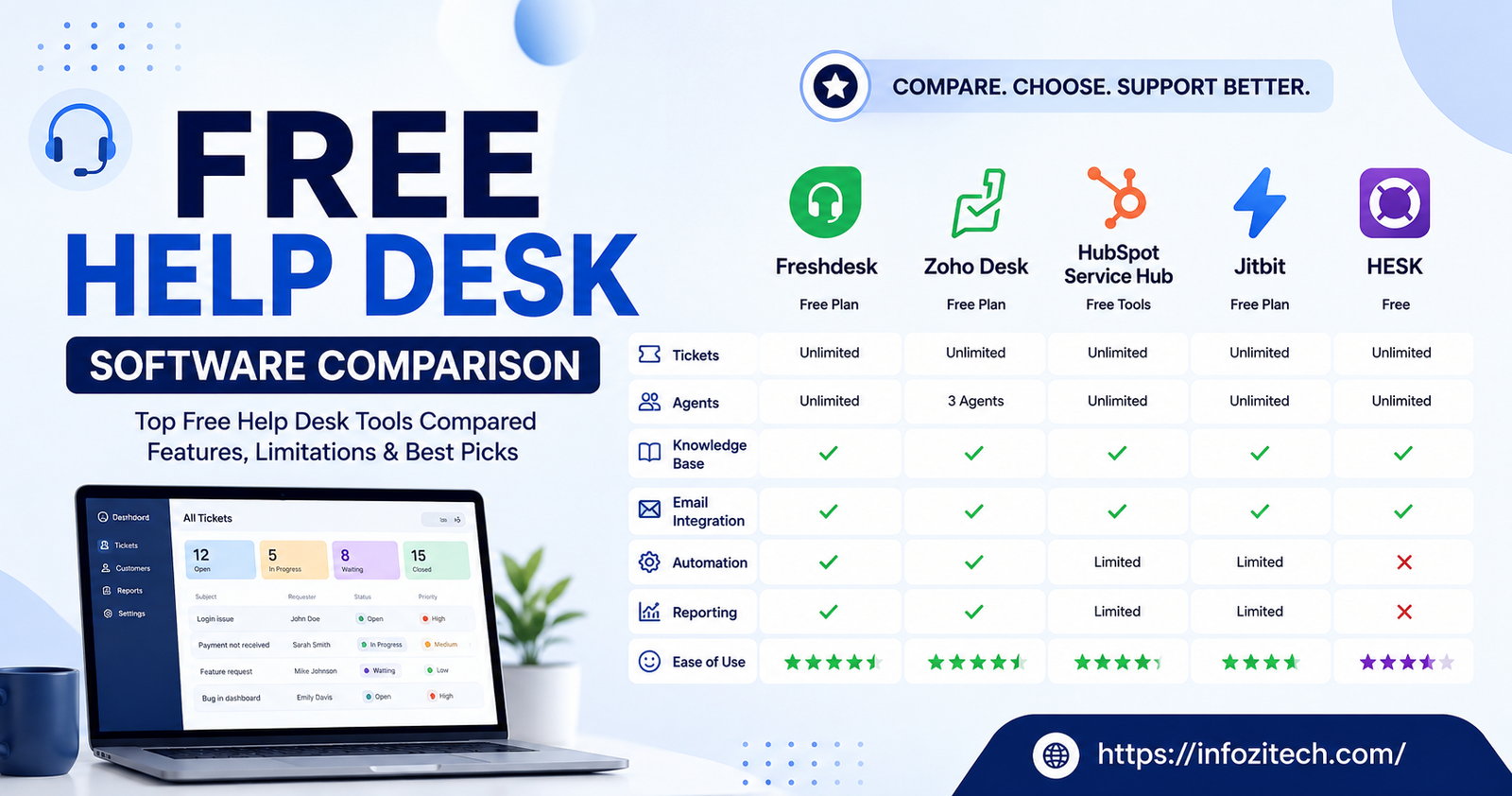
Freshdesk’s free tier — called Sprout — is genuinely one of the more generous ones out there. Unlimited agents, which is rare for free software. You get a shared inbox, some basic automation, and a knowledge base builder that doesn’t feel like an afterthought.
Where it falls short: the automation rules stay pretty basic, and beyond email plus a simple contact form, there’s no multi-channel support to speak of. Reporting is thin too. You’ll get ticket volume numbers. Don’t expect anything close to real analytics.
Best for: small teams handling mostly email support who want something clean and easy to learn without touching a server.
2. Zoho Desk (Free Edition)
Three agents- that’s the cap. But those three seats get a solid built-in knowledge base, email ticketing, and decent contact management. And if your business already lives inside other Zoho apps, the integration just works, no fuss.
Where it falls short: three agents is a hard wall, and live chat isn’t included at all on the free tier — that’s paid-plan only. Automation stays limited to a handful of basic workflow rules, nothing fancy.
Best for: small teams already using Zoho tools, or anyone who wants a help desk that can eventually grow into a full CRM-connected stack.
3. HubSpot Service Hub (Free Tools)
HubSpot doesn’t really sell a dedicated free help desk product. What it has instead is a free CRM that includes a shared inbox, basic ticketing, and live chat — and honestly, a lot of small teams just use that as their help desk. Because it’s tied into the CRM, you get customer history sitting right next to each ticket, which is genuinely useful.
Where it falls short: it wasn’t built primarily as ticketing software. SLA management, routing rules, detailed reporting — that stuff is either missing entirely or locked behind a paid Service Hub tier.
Best for: businesses already running on HubSpot’s free CRM who want support tickets tied to sales and marketing context instead of sitting in their own silo.
4. osTicket
One of the oldest names here. Fully open-source, free forever, no agent cap — as long as you’re willing to self-host it. It handles routing, custom fields, and SLA rules reasonably well for something with zero license fee attached.
Where it falls short: the interface looks dated, and I mean genuinely dated. You’ll want someone comfortable with PHP and MySQL to get it running and keep it patched. No built-in live chat. Mobile experience is weak, bordering on nonexistent.
Best for: IT teams or technically capable orgs that want full control over their data and don’t mind trading a subscription for setup work.
5. Spiceworks Help Desk
Spiceworks made its name as free IT management software, and the help desk module is genuinely free — no agent limits at all — because it’s funded through ads and vendor sponsorships rather than subscriptions. It’s particularly strong for internal IT, with asset tracking built right into the ticketing flow.
Where it falls short: it’s cloud-hosted through Spiceworks‘ own infrastructure, and the interface can feel cluttered, a bit busy. It’s clearly built with internal IT support in mind, so for customer-facing support — e-commerce, SaaS, that kind of thing — it’s an awkward fit.
Best for: internal IT departments that want ticketing tied to hardware and software assets, without spending anything.
6. Hesk
Lightweight. Self-hosted. Been around for years and has a loyal following among small IT shops, the kind of tool people quietly recommend to each other. The free version covers two staff accounts and handles the basics well enough: ticket categories, a simple knowledge base, email piping.
Where it falls short: two agents is genuinely tight. The interface feels older than most competitors on this list. There’s also a paid hosted version if self-hosting isn’t something you want to deal with.
Best for: very small teams or solo IT consultants who want something simple and don’t need fancy automation getting in the way.
7. Zammad
Open-source, and it’s picked up a real following as a more modern-feeling alternative to osTicket. Self-hosted, free, no agent limits, and it supports multiple channels — email, chat, even Twitter integration in some configurations.
Where it falls short: self-hosting Zammad takes more resources than osTicket or Hesk, and the setup curve is steeper. Community support exists and is decent, but it’s not as deep as what commercial vendors offer.
Best for: technically comfortable teams that want a genuinely modern interface and multi-channel support without paying licensing fees.
Quick Comparison at a Glance
| Tool | Agent Limit (Free) | Hosting | Best Fit |
|---|---|---|---|
| Freshdesk Sprout | Unlimited | Cloud | Small email-based support teams |
| Zoho Desk Free | 3 agents | Cloud | Zoho ecosystem users |
| HubSpot Service Hub | Unlimited (basic tools) | Cloud | CRM-connected support |
| osTicket | Unlimited | Self-hosted | Technical IT teams |
| Spiceworks Help Desk | Unlimited | Cloud | Internal IT departments |
| Hesk | 2 agents | Self-hosted | Solo consultants, tiny teams |
| Zammad | Unlimited | Self-hosted | Modern multi-channel setups |
How to Actually Choose
Start honest. How big is your team, and how technical are they, really? If nobody wants to touch a server — and be honest about this, most teams don’t — cross osTicket, Hesk, and Zammad off the list right away. Doesn’t matter how appealing “free forever” sounds. The hidden cost is time, and time isn’t free even when the software is.
If you’re small and mostly handling email, Freshdesk’s Sprout plan is tough to beat for zero dollars. Already living inside Zoho or HubSpot? Stay there. Fragmenting customer data across tools that don’t talk to each other tends to cause more headaches than it saves.
And if you’re internal IT rather than customer-facing support, Spiceworks deserves a serious look. It was built for that exact use case from day one instead of being bent into shape from generic customer service software.
Final Thoughts
None of these are going to be perfect out of the box. That’s fine. Free help desk software is a starting point, not a destination — most growing teams eventually hit a ceiling where they need better automation, real reporting, or more seats than the free tier gives them. The smart move is picking a tool whose paid tier you’d actually be happy growing into, not one you’ll end up abandoning the moment you outgrow it.
Try two or three of these with a small pilot group before rolling anything out company-wide. Ticket volume and team habits expose gaps that a comparison chart never quite catches. An hour of actually poking around inside the tool will tell you more than reading about it ever will. This article included.






2 thoughts on “Free Help Desk Software Comparison: Which Tool Actually Deserves Your Time in 2026”