
Client Follow-Up Workflow Without CRM: A Simple System That Actually Works
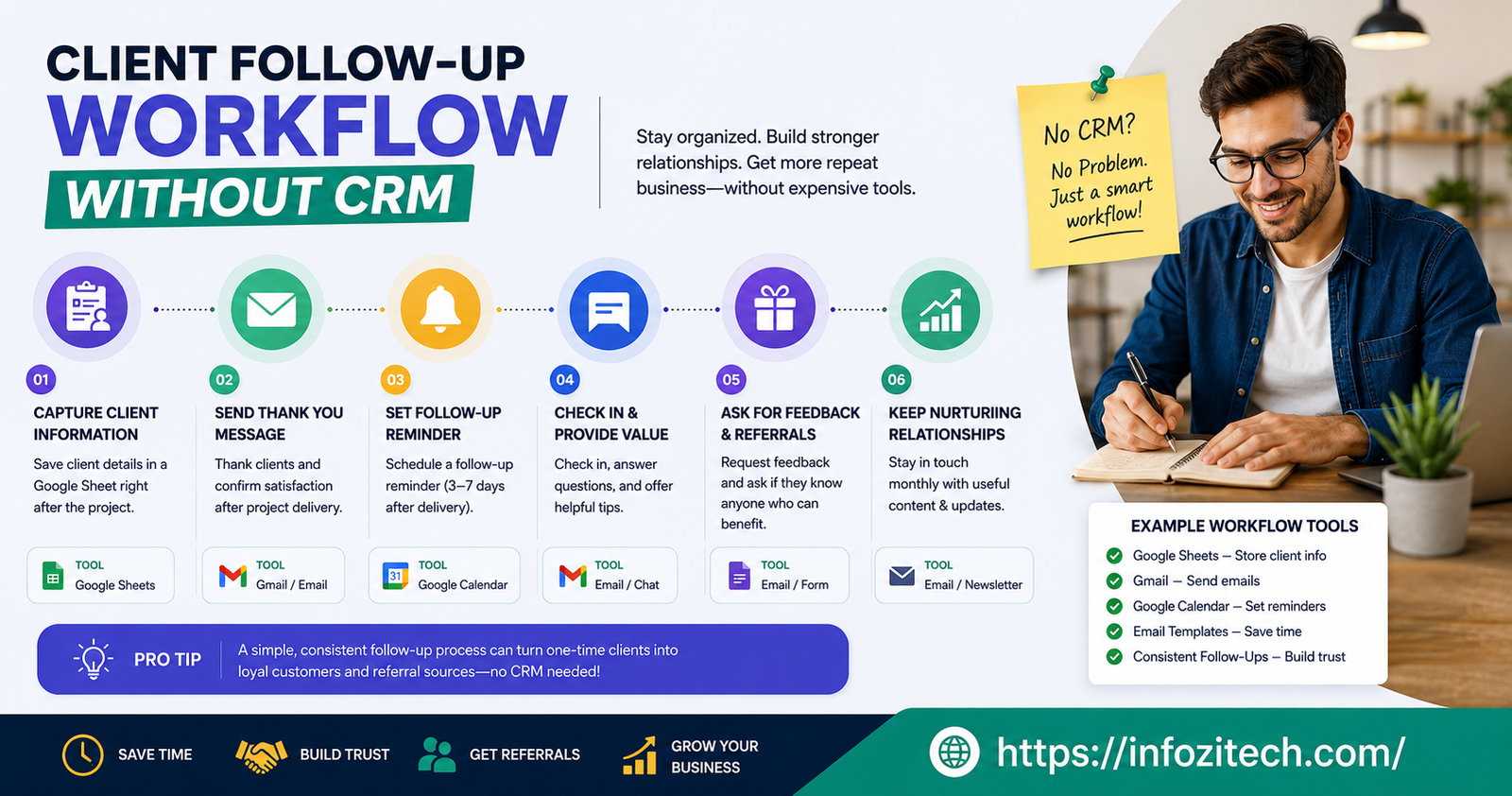
There was a stretch a while back where I lost track of three good leads in the same month. Not because they said no. They just never heard back from me again. One of them I found sitting in my inbox almost a month later, unanswered, and by then it felt too late to even reply — awkward, like showing up to a party three hours after it ended. That’s not a talent problem. That’s just what happens when you don’t have a system, and you’re relying on your own memory to do the job a system should be doing.
The go-to advice is always “get a CRM.” Eventually, maybe. But a CRM without a real habit underneath it is just an expensive place to lose people in a more organized way. I know people who’ve signed up, spent an entire Saturday building out pipeline stages and tags and custom fields, felt great about it, and then never logged back in after the third week. The tool wasn’t the problem. It was just heavier than what the job actually needed at that size.
If it’s just you, or you and one or two other people, you can build something that works just as well using tools already sitting open on your computer. No new subscription, no onboarding video to watch first.
Why Skip CRM Software in the First Place
The Real Cost of Complexity
Nobody tells you this part, but setting up a CRM can quietly become its own form of procrastination. You spend three hours configuring dropdown fields and pipeline stages, and you feel productive doing it, except you haven’t actually messaged a single real client that whole time. I’ve fallen into that trap myself. It felt like progress. It wasn’t.
Friction is really the whole story here. If logging an update takes ten seconds, you’ll do it every time without a second thought. If it takes two minutes of clicking through menus you don’t fully remember the logic of, you’ll skip it “just today” — and then again tomorrow, and within a month the whole thing is stale, and nobody trusts it anymore.
When CRM Actually Makes Sense
This isn’t an anti-CRM article. Once you’re juggling dozens of active leads, or working with a team that needs to see the same client history at the same time, software earns its keep fast. Automated follow-up sequences, shared visibility across a team, real reporting — genuinely worth it at that scale. What follows here is for the stage before that, where the missing piece isn’t more features. It’s just some actual structure.
The Core Principles of a No-CRM Follow-Up System
Capture Every Lead in One Place
Most people don’t lose clients because they’re lazy. They lose them because the information is scattered — a name in Gmail, a note scribbled somewhere by the phone, a third lead that only exists in memory because “they seemed really interested, I’ll remember that one.” You won’t. Nobody’s brain works as a database, no matter how sharp you think your memory is, and treating it like one is exactly how things slip through.
Pick one place and stick to it. Spreadsheet, plain document, notes app — doesn’t much matter which. What matters is that there’s only one.
Set a Follow-Up Trigger the Moment You Meet Someone
Every new contact gets a follow-up date attached the second the conversation ends. Not “soon.” An actual date, written down before you move on to the next tab or the next call. This single habit carries more weight than any software feature ever could, because it turns a vague feeling — I should probably reach back out to them — into a scheduled task that exists whether or not you happen to remember it later.
Build in Repetition, Not Memory
Deals seldom die after one missed follow-up. They die slowly, after the third or fourth one quietly never happens because the person fell out of rotation and nobody caught it. A system built around a single touchpoint isn’t a system; it’s a to-do list item that happened once. Real follow-up assumes people need to hear from you more than once — often three or four times — and builds that in from the start rather than counting on you to remember on your own.
Tools You Already Have That Work Just Fine
Spreadsheets as a Lightweight Pipeline
A plain spreadsheet can do most of what a CRM does if you’re not managing hundreds of contacts at once. Name, contact info, where the lead came from, last contact date, next follow-up date, current status. That’s really it. Mark the overdue ones red, and there’s instant visual pressure to deal with them — no automation needed, just color.
The nice thing about a spreadsheet is there’s nothing new to learn. It works without internet, and you can shape the columns around how your business actually runs instead of bending your process to fit somebody else’s template because that’s how their software happened to be built.
Your Email Inbox as a Tracking System
If you basically live in your inbox anyway, and a lot of people do, whether they mean to or not, email can double as your tracker. Labels like “Follow Up This Week” and “Follow Up Later” turn the inbox itself into a sorting system. Snoozing a message so it resurfaces on the exact day you meant to follow up is one of the more underrated tricks out there, because the reminder shows up right where you’re already looking anyway.
Calendar Reminders as Your Safety Net
People underrate calendars for this. A calendar event with the client’s name and whatever the next step is means the reminder comes and finds you, instead of you having to remember to go hunting for it somewhere else. If your whole day already runs off your calendar for meetings, this is probably the easiest option of the three to actually stick with.
Setting Up Your Follow-Up Workflow Step by Step
Step 1: Create Your Master Tracking Sheet
Open one document. Dump every active lead and every client currently mid-conversation into it. Don’t worry about making it neat yet — the point right now is just getting everyone out of your head and out of scattered emails and into one visible list. Add a status column so a glance tells you who’s brand new, who’s mid-conversation, and who’s close to closing.
Step 2: Define Your Follow-Up Cadence
Decide ahead of time how often you’ll check back in with someone who’s gone quiet. A common rhythm is two to three days after the first contact, another nudge about a week after that, then one final message two to three weeks later. Deciding this in advance matters more than it sounds like it should, because it removes the decision from the moment. You’re not sitting there wondering whether today’s the day to follow up. You already decided that weeks ago. You’re just executing it.
Step 3: Write Templates You Can Reuse
Nobody wants to write a fresh message from scratch every single time. Draft three or four short templates ahead of time — an initial follow-up, a check-in for someone who’s gone silent, and a final “just checking if this is still something you’re interested in” message. Keep them short and human, and leave a spot for one specific detail so it doesn’t read like a form letter, even though, let’s be honest, it kind of is one. Having these ready is the difference between follow-up feeling like a chore and taking thirty seconds.
Step 4: Review Your List Weekly
Block off one time each week — Monday morning, before the week has a chance to eat your attention, tends to work well for a lot of people — and go through the whole tracker. Anyone overdue or coming due this week gets a message. This weekly review is really the entire system in one habit. Skip it a couple weeks in a row, and you’re right back to scattered notes and nothing tracked.
Common Mistakes That Break a Manual Follow-Up System
Relying on Memory Instead of a Written Trigger
The most common way this falls apart: you tell yourself “I’ll remember to follow up with them,” and the moment that thought crosses your mind, you’ve recreated the exact gap the whole system was built to close. Write it down every time, even when you’re sure you’ll remember. Especially then, honestly.
Following Up Once and Giving Up
A lot of people aren’t ignoring you because they’re not interested — they’re busy, or dealing with something unrelated entirely, and your one message got buried under forty others in a day. Stop after a single unanswered email, and you’re walking away from deals that were still very much winnable. That’s exactly what the cadence from Step 2 exists to protect against.
Letting the Spreadsheet Get Messy
A tracker only works if you actually trust it. Duplicate rows, outdated statuses, half-filled entries — all of that quietly wears down your confidence in the system until one day you just stop opening it. Clean it up during the weekly review instead of letting the mess pile up for months. Five minutes a week versus a miserable afternoon later, that’s the trade.
When It’s Time to Upgrade to a CRM
At some point, for a lot of growing businesses, the spreadsheet starts groaning under its own weight. That’s usually the sign — more people to follow up with than you can realistically get through in one sitting, teammates who need to see the same client history, or an actual need for automated sequences instead of typing out the same message by hand for the fortieth time.
Even then, the habits carry over. Assigning a follow-up date the moment you meet someone, building in more than one touchpoint, reviewing the whole list on a set schedule — none of that changes just because the tool underneath it did. A CRM makes an already-working process faster. It doesn’t create discipline that wasn’t there to begin with.
Most missed follow-ups, when you get down to it, aren’t a technology problem. They’re a habit problem. A spreadsheet, a couple of labeled folders in your inbox, and fifteen honest minutes once a week will outperform an expensive, half-used CRM more often than not — because the system you actually use always beats the one that just looks impressive sitting there unopened.









2 thoughts on “Client Follow-Up Workflow Without CRM: A Simple System That Actually Works”